WhatsApp stops being your ops manager’s phone. It becomes your pipeline.
Transactional WhatsApp fires on every key record lifecycle — enquiry, quote, contract, invoice, visit, renewal. Your current provider almost certainly works. The optional Marketing addon adds campaigns with closed-loop revenue attribution, so you can finally see which campaigns pay for themselves in rupees.
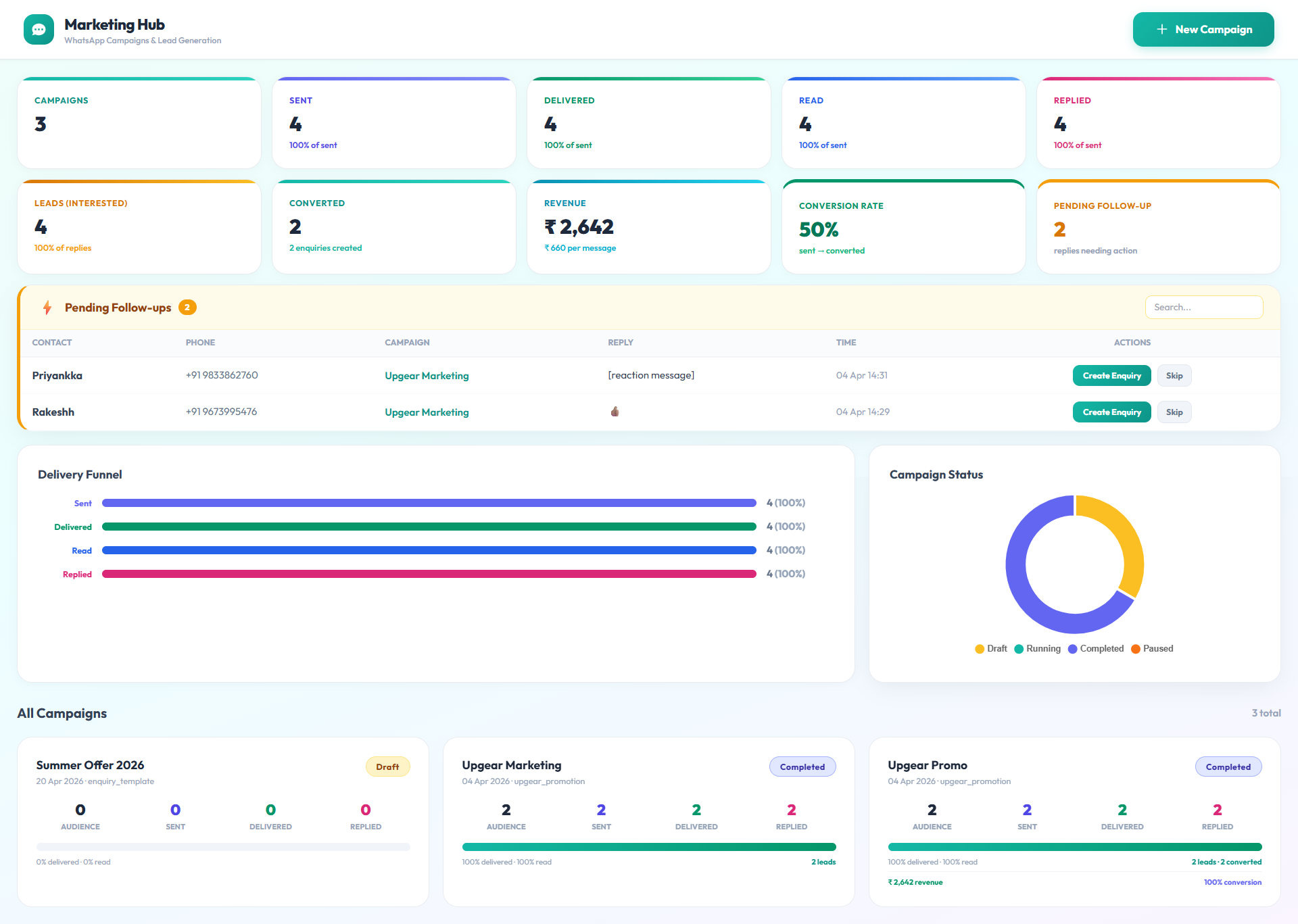
Three scenarios that describe the real change.
Your enquiries stop living on your ops manager’s phone
An overnight WhatsApp enquiry from a corporate client lands in the system automatically, tagged by source, assigned to the right sales rep by your routing rule. Your ops manager no longer has to forward three screenshots to three people at 7:45 in the morning. You see the enquiry on a dashboard, not in a group chat.
Every renewal reminder fires on schedule without someone remembering
Thirty, fifteen, and seven days before a contract expires, Upgear sends the customer a WhatsApp template in your voice. You see the replies on a dashboard filtered to “renewal conversations in progress”. You stop being the person who chases. You become the person who closes.
Your marketing campaigns prove their own ROI in rupees
You run a Diwali offer to 1,200 past customers. The WhatsApp Marketing addon tracks it end-to-end: who received it, who opened it, who replied, which replies became enquiries, which enquiries became quotations, which quotations became contracts, and which contracts billed. You see the campaign’s contribution in rupees on the dashboard, not just “delivered” and “read” vanity metrics.
Six things that ship with WhatsApp in Upgear.
Enquiry captured, quotation sent, contract accepted, invoice generated, visit scheduled, visit rescheduled, visit completed, renewal reminder, Google-review ask, visit feedback, and OTPs all fire automatically through WhatsApp. You configure each template once with your voice and branding; the platform fires them on schedule forever.
Whether you use Gupshup, Interakt, Wati, AiSensy, Gallabox, Kaleyra, MSG91, or one of several others, Upgear plugs in without a re-integration project. You switch providers from Settings if you need to; everything above the integration layer keeps working.
A webhook receives incoming WhatsApp messages and creates enquiry records automatically. Your sales team works from a clean pipeline screen instead of scrolling a group chat. Messages are still available as thread context on the record.
When a customer replies “STOP” (or any of the standard opt-out patterns) on any template, the opt-out applies across all future transactional and marketing sends. One dashboard shows your opt-out list, recoverable opt-ins, and suppression reasons.
The WhatsApp Marketing addon ships with four ready-made segments: past customers, active AMC holders, lapsed AMC holders, and enquiry-stage leads. You can filter further by geography, service category, or contract value. Custom segments are saved for re-use.
Every marketing send carries a campaign identifier that follows the customer through reply, enquiry, quotation, contract, and invoice. Your campaign dashboard shows spend vs. rupees-won per campaign. You stop justifying marketing on delivered/read metrics and start justifying it on P&L impact.
Four steps. Transactional is live on day two; marketing when you’re ready.
Pick your WhatsApp provider
From Settings, choose your current WhatsApp Business Service Provider (BSP) and paste the API credentials they provided. If you don’t have a BSP yet, we recommend one and help you onboard. Takes 10–20 minutes.
Approve your transactional templates
Upgear ships with a starter pack of templates for the lifecycle events (quotation sent, invoice generated, renewal reminder, etc.). You adjust the language and branding; your BSP submits them to Meta for approval. Typical turnaround is 24–48 hours.
Turn on transactional sends
Once templates are approved, every new record transition fires its WhatsApp template automatically. You don’t re-configure anything when a new customer is created — the platform wires it up.
Add the Marketing addon when you’re ready for campaigns
If you want campaigns with revenue attribution (most operators turn this on 2–3 months in), subscribe to WhatsApp Marketing from Settings. The first campaign can be drafted and sent in under 30 minutes; the ROI dashboard starts populating the same day.
Transactional WhatsApp is included in Upgear Core. The WhatsApp Marketing addon is optional. Pricing tailored to your operation — quoted on the demo.
Meta’s per-message fees pass through at your provider’s published rates. No markup.
WhatsApp is the spine of the Customer Engagement pillar.
It sits alongside SMTP-backed email (for invoices and statements), Razorpay-linked payment links, and the transactional / marketing dashboards. Together they carry the customer relationship from first enquiry through renewal.
Three honest constraints before you turn this on.
WhatsApp is a platform we build on, not a platform we own. These are the edges where Meta’s rules meet your operations.
Template approvals take 24–48 hours on first submission
Meta’s template approval process is outside Upgear’s control. First-time approvals typically take 24–48 hours; minor edits typically approve in under an hour. Plan your migration with this in mind — don’t expect day-one outbound on custom templates. Upgear’s starter pack is pre-approved with our reference BSPs and works immediately.
Meta’s pricing, messaging rules, and caps apply
WhatsApp per-message fees, 24-hour session windows, marketing-send caps, and content policy are all Meta rules. Upgear passes these through at your BSP’s published rates — we don’t mark them up. If Meta changes pricing or rules, your operations adjust alongside everyone else’s.
Switching BSPs mid-deployment has a short continuity gap
If you decide to switch WhatsApp providers (rare but it happens, usually for pricing reasons), templates need to be re-approved with the new BSP — there’s a 24–48 hour gap. Upgear queues messages during the switch so nothing is lost, but delivery is delayed until the new BSP is live. Most customers never change providers once they’re live.
What operators ask before turning on WhatsApp in Upgear.
See your WhatsApp pipeline running in Upgear.
30-minute demo, founder-led. Bring a recent enquiry screenshot and a renewal reminder you wish had gone out. We’ll reconstruct both flows in Upgear on the call — and show you the campaign ROI dashboard on live-looking data.