Buddy-punching ends. And you can prove your staff were on site.
Face-verified check-ins run on your own server — no cloud API bills, no data leaving your tenant. Mismatches go to a supervisor review queue. Rejected check-ins are auto-excluded from payroll. Tailored-pricing addon — typically pays for itself on one 20-person crew where buddy-punching is real money.
Three scenarios that describe the real change.
A buddy-punched attendance entry is caught at the supervisor review screen
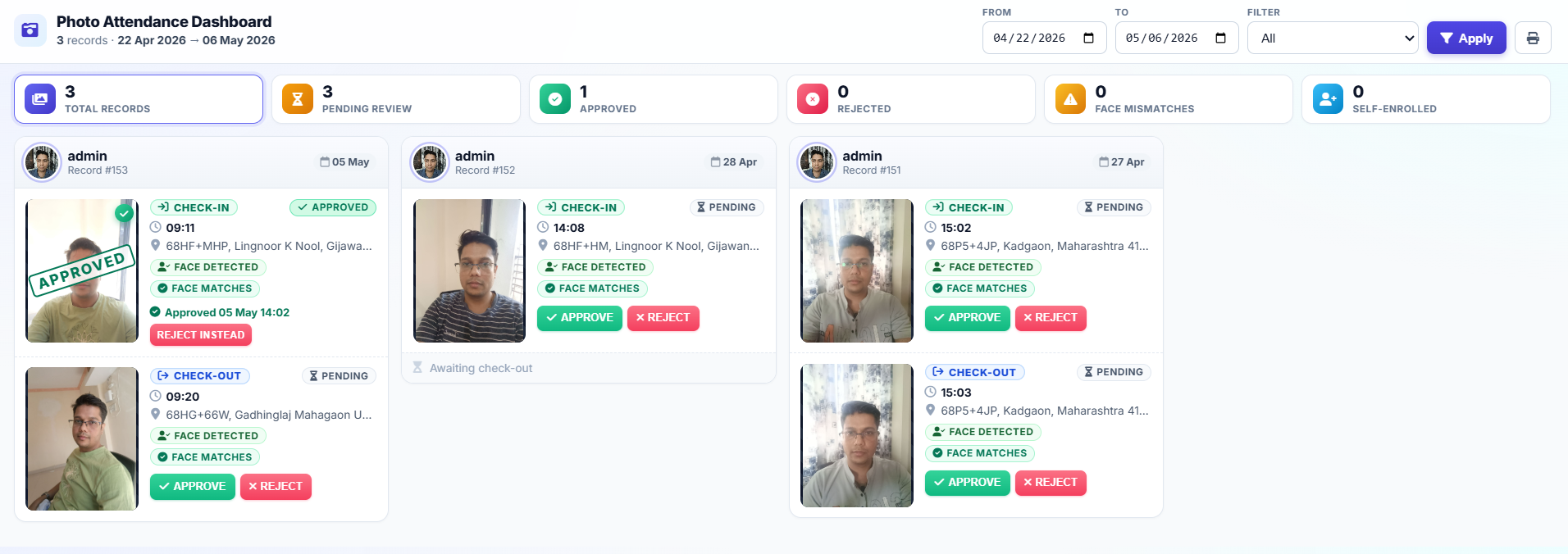
A cleaner signs in twice — once with their own face, once thirty seconds later holding their friend’s phone. The second check-in lands on the supervisor review queue, flagged “possible mismatch”. The supervisor opens the record, sees two different faces, rejects the second entry. Payroll only counts the first. What used to be an invisible line-item on your monthly cost becomes a flagged exception that doesn’t ship.
You win a commercial contract because you can prove your staff were on site
Your prospect is a hospital that requires vendor-staff face-verification with photo and GPS on every check-in. Two of your competitors lose the contract at the vendor-evaluation stage. You win it because you can show last month’s daily face-verified check-in log in under thirty seconds from your phone. The contract is worth ₹8 lakh/year.
Your payroll reconciliation stops being a monthly three-person exercise
On the 30th of the month, your ops lead pulls the attendance report filtered to “approved” only. The rejected check-ins are already excluded. Payroll processes in an hour, not a day. The eight WhatsApp threads arguing about “did Rajesh come to work on the 14th” that used to clutter your month-end are gone.
Six things that ship with Face Attendance.
No third-party cloud API is called for face verification. The recognition model runs inside your Upgear tenant infrastructure — which means zero per-verification cloud charges, and your employee face data never leaves your tenant.
Every check-in captures: the employee’s face photo, their GPS coordinates with a reverse-geocoded address, and the timestamp. Each of the three can be cross-checked when a dispute arises — “the tech says they were at the site but the GPS shows 4 km away” becomes a one-click answer.
When the face match score falls below the configured threshold, the check-in goes to a supervisor review queue rather than being auto-rejected. The supervisor sees the enrolled photo and the check-in photo side by side, decides to approve or reject. Human judgement on edge cases; automation on the majority.
When a supervisor rejects a flagged check-in, it is automatically excluded from the monthly attendance report that feeds payroll. The policy is configurable — for some operators, flagged-but-unreviewed check-ins are counted (benefit of doubt); for others, they’re excluded until reviewed. Your call.
No special hardware. Any cheap Android phone with a working camera handles this — your technician or cleaner opens Upgear in the browser, allows camera access, takes the selfie. The field-facing interface is web-based, so no app install is required.
To enable face verification for an employee, you take one enrolment photo of their face. The system extracts the signature and stores it encrypted inside your tenant. A 20-person crew can be enrolled in a morning. Re-enrolment for a person who changed significantly (beard, weight, glasses) takes the same 60 seconds.
Four steps. Enrolment is the only real project.
Subscribe to Photo Attendance addon
From Settings, enable Photo Attendance. Your tenant is configured with the recognition infrastructure on your dedicated instance. Takes under ten minutes on onboarding day.
Enrol your staff
Each employee takes one enrolment photo through the Upgear interface. Your HR or ops lead reviews each enrolment to confirm quality (good lighting, face facing camera). A 20-person crew takes about one morning; a 100-person workforce takes one working day distributed across branches.
Set your match threshold and review policy
You choose how strict the face match is — a stricter threshold means more flagged mismatches for supervisor review; a looser one means fewer flags but more risk of buddy-punching slipping through. The default is a reasonable middle-ground; you adjust after one week of real usage.
Train your supervisors on the review queue
Supervisors will see flagged check-ins daily. Training is ten minutes: open the queue, compare enrolled vs. check-in photo, approve or reject. After one week, supervisors are reviewing in seconds per entry.
Optional addon on top of Upgear Core. Pricing tailored to your operation — quoted on the demo. No per-verification cloud API cost, because the recognition runs on your own server.
Typical ROI: one 20-person crew with buddy-punching eliminated pays for the addon in the first month.
Face Attendance is the verification layer of the Workforce & Payroll pillar.
It sits alongside GPS-stamped attendance (included in Core), India-typical leave types, attendance-proportionate payroll with monthly approval, per-employee overtime and late-deduction rates, and salary-slip PDFs with your letterhead. Together they replace paper registers and WhatsApp-as-attendance-system.
Three honest constraints before you turn this on.
Face recognition has physical-world limits. Here’s where to expect them.
Poor lighting and low-quality cameras reduce accuracy
Face recognition needs a reasonably lit face facing the camera. In pitch-dark sites (night shifts at unlit compounds), accuracy drops and more check-ins land on the review queue. For consistently dark environments, a cheap ring-light or torch improves capture quality materially. This is not an Upgear limit; it’s a face-recognition-in-general limit.
Enrolment is a one-time but real project
Enrolling 20 people is a morning. Enrolling 200 people across 6 branches is a week of coordination — not hard, but real. We plan enrolment alongside the broader onboarding. Most ops leads don’t find this onerous once they’re in it, but it is worth knowing it exists on day one.
Significant appearance changes require re-enrolment
If a staff member grows a beard, shaves a beard, gains or loses significant weight, or permanently starts wearing glasses, their original enrolment may start failing. Re-enrolment takes 60 seconds. This is rare in practice but worth naming so supervisors know to handle a run of flagged mismatches for one specific person by re-enrolling rather than debugging.
Photo attendance with face match happens inside the Upgear Mitra app — technicians take a selfie at check-in; the on-premises face recognition validates identity; the supervisor reviews any flagged photos in the office. See the Mitra workflow →
What ops leads ask before enrolling their team.
See Face Attendance running on a real crew.
30-minute demo, founder-led. Bring a copy of your current attendance register and a recent buddy-punching argument. We’ll show you the face-verification flow, the supervisor review queue, and the payroll integration on the call. The subscription-versus-cost math usually writes itself for a multi-site operation.